I’m using Postgres in a production capacity for the first time and have been excited to get my hands on it after decades of MySQL and being yelled at by other nerds for not using Postgres.
Doing some maintenance on a large-ish (~7m rows) database, I was somewhat disappointed by how the default optimiser doesn’t seem to do much with relatively basic sub-queries. I had always thought one of the big weaknesses of MySQL was terrible sub-query performance, and in my head, it was one of the strengths of Postgres.
Example:
SELECT * FROM logs WHERE uuid IN (SELECT uuid FROM logs LIMIT 1)
There is no index/primary key on uuid. This query is ridiculously slow. The optimiser obviously does not magically figure out it can do the sub-query first and just operate on the results.
Migrating from a very old Debian install to a newer VPS with a more recent version of Apache and the mpm-itk mod, I was having problems with sending mail using the standard PHP mail() call (first seen when the WP contact form I was using was throwing a “Sorry, email message could not be delivered” error).
exim4 log reported the following:
unable to set gid=33 or uid=0 (euid=0): forcing real = effective
This thread contained a post indicating the problem was the LimitGIDRange/LimitUIDRange options; it seems if these are not specified there are some defaults (perhaps with very low values, or perhaps it’s just that if it’s not set it will not work at all) that need to be overridden.
Defining these values in the global Apache configuration fixes it.
I’ve had PHPMailer happily sending email through the Gmail API (as part of a G Suite subscription) for a while now and it mysteriously stopped working yesterday (29th Sep, 2017), throwing the following output with debug enabled:
2017-09-30 11:24:52     SERVER -> CLIENT: 220 smtp.gmail.com ESMTP v2sm1805443wmf.8 - gsmtp

2017-09-30 11:24:52     CLIENT -> SERVER: EHLO trog-pc

2017-09-30 11:24:52     SERVER -> CLIENT: 250-smtp.gmail.com at your service, [86.170.8.39]

                                          250-SIZE 35882577

                                          250-8BITMIME

                                          250-STARTTLS

                                          250-ENHANCEDSTATUSCODES

                                          250-PIPELINING

                                          250-CHUNKING

                                          250 SMTPUTF8

2017-09-30 11:24:52     CLIENT -> SERVER: STARTTLS

2017-09-30 11:24:52     SERVER -> CLIENT: 220 2.0.0 Ready to start TLS

2017-09-30 11:24:52     SMTP Error: Could not connect to SMTP host.

2017-09-30 11:24:52     CLIENT -> SERVER: QUIT

2017-09-30 11:24:52     SERVER -> CLIENT:     M   I   A ��] P *g�� 87� �*��h�!T��

[multiple line binary gibberish removed]

2017-09-30 11:24:52     SMTP ERROR: QUIT command failed:     M   I   A ��] P *g�� 87� �*��h�!T�� [multiple line binary gibberish removed]

2017-09-30 11:24:52     SMTP connect() failed. https://github.com/PHPMailer/PHPMailer/wiki/Troubleshooting

Mailer Error: SMTP connect() failed. https://github.com/PHPMailer/PHPMailer/wiki/Troubleshooting
It looks pretty clearly like a crypto error and the step in the Troubleshooting guide (helpfully provided in the error message!) relating to the OpenSSL check made it seem pretty clear that it was a problem.
The OpenSSL test result looked like this:
C:\files\Apps\OpenSSL>openssl s_client -starttls smtp -crlf -connect smtp.gmail.com:587

CONNECTED(0000019C)

depth=1 C = US, O = Google Trust Services, CN = Google Internet Authority G3

verify error:num=20:unable to get local issuer certificate

---

Certificate chain

 0 s:/C=US/ST=California/L=Mountain View/O=Google Inc/CN=smtp.gmail.com

   i:/C=US/O=Google Trust Services/CN=Google Internet Authority G3

 1 s:/C=US/O=Google Trust Services/CN=Google Internet Authority G3

   i:/OU=GlobalSign Root CA - R2/O=GlobalSign/CN=GlobalSign

---

Server certificate

-----BEGIN CERTIFICATE-----

MIIEjDCCA3SgAwIBAgIIa79pDvQYxx0wDQYJKoZIhvcNAQELBQAwVDELMAkGA1UE

BhMCVVMxHjAcBgNVBAoTFUdvb2dsZSBUcnVzdCBTZXJ2aWNlczElMCMGA1UEAxMc

R29vZ2xlIEludGVybmV0IEF1dGhvcml0eSBHMzAeFw0xNzA5MTMxNzUyMjVaFw0x

NzEyMDYxNzExMDBaMGgxCzAJBgNVBAYTAlVTMRMwEQYDVQQIDApDYWxpZm9ybmlh

MRYwFAYDVQQHDA1Nb3VudGFpbiBWaWV3MRMwEQYDVQQKDApHb29nbGUgSW5jMRcw

FQYDVQQDDA5zbXRwLmdtYWlsLmNvbTCCASIwDQYJKoZIhvcNAQEBBQADggEPADCC

AQoCggEBAJBSmxMU1SnUDEN7W9D97mjMOMhbrDPqocU1iVgdUaUuLDDvabwb1PjE

SoSpWZpva+13ZcWnHTvw+oYA+y8yjKALGQopDXjSA9OKu2TdK4gLg05PgCvFHgXd

dOJUkkyctAfthO4oll1/NhFa5w+Juv0p5UI7aSLklFxjH7B4Iv8C85vGa5YPftkt

VOCj0rWHOXeZF14qFsWYcH8azRZKU4ih9S8IoeSgfnMhxJRnjexwVNA5MJ/ig3zT

d0q7pK8usd+rbABshztIKA2AAB0g6NueOVGI4GCT/r8MAKbezi6I5U2Kw5Ja0RJl

e0HTq+dCSc9z5Yb86/+yOEDLy3h2BV8CAwEAAaOCAUwwggFIMB0GA1UdJQQWMBQG

CCsGAQUFBwMBBggrBgEFBQcDAjAZBgNVHREEEjAQgg5zbXRwLmdtYWlsLmNvbTBo

BggrBgEFBQcBAQRcMFowLQYIKwYBBQUHMAKGIWh0dHA6Ly9wa2kuZ29vZy9nc3Iy

L0dUU0dJQUczLmNydDApBggrBgEFBQcwAYYdaHR0cDovL29jc3AucGtpLmdvb2cv

R1RTR0lBRzMwHQYDVR0OBBYEFD3FXTx/EAB0m7BLwZC8B7Bh/+TUMAwGA1UdEwEB

/wQCMAAwHwYDVR0jBBgwFoAUd8K4UJpndnaxLcKG0IOgfqZ+ukswIQYDVR0gBBow

GDAMBgorBgEEAdZ5AgUDMAgGBmeBDAECAjAxBgNVHR8EKjAoMCagJKAihiBodHRw

Oi8vY3JsLnBraS5nb29nL0dUU0dJQUczLmNybDANBgkqhkiG9w0BAQsFAAOCAQEA

DWhdK0rwWV7Q2lBk2oukJBgmptwWsPHtkYjnhjqRXzAwAg6iqXJrf6BUmdgK4Vvp

rj0qeE9kcTudvZwMPVxS7gcjk66v79n2NvE2QBKGZnlUC/4S93jgQVuDZMwmKF3n

ArjDQ0zE2o6wfM3I3yNkzT+/ZxXtrYzhPmRmbVKWTgMSJvWwN6H2T7An+1JXl11A

7Tf5VeiPSI/kvCByw7sezFDRHbnj2uXZz23DymT75zgF/V3Nbzmg3htdlVnyB2Xp

kMKl5swPBrBuui2+et9ZN7vYjZRdHy0jg/PB9lfpdA2CQnIHcq/vIYBzmi+TSms1

vNaIty8ekNsvigjIzn13eg==

-----END CERTIFICATE-----

subject=/C=US/ST=California/L=Mountain View/O=Google Inc/CN=smtp.gmail.com

issuer=/C=US/O=Google Trust Services/CN=Google Internet Authority G3

---

No client certificate CA names sent

Peer signing digest: SHA256

Server Temp Key: ECDH, P-256, 256 bits

---

SSL handshake has read 3246 bytes and written 468 bytes

---

New, TLSv1/SSLv3, Cipher is ECDHE-RSA-AES128-GCM-SHA256

Server public key is 2048 bit

Secure Renegotiation IS supported

Compression: NONE

Expansion: NONE

No ALPN negotiated

SSL-Session:

    Protocol  : TLSv1.2

    Cipher    : ECDHE-RSA-AES128-GCM-SHA256

    Session-ID: 927522CACEB8BB3D0FB305E197235C64D147A4CC26643AB60EB5F110E787FA98

    Session-ID-ctx:

    Master-Key: 8D698AF5A7790DC4836430F2FA6157B310CF0DDA684B5160BEC643B966E9CCC41598D34D03DA0579893A6CAFB62C2B33

    Key-Arg   : None

    PSK identity: None

    PSK identity hint: None

    SRP username: None

    TLS session ticket lifetime hint: 100800 (seconds)

    TLS session ticket:

    0000 - 00 33 97 a3 0b be 7f 8d-47 f3 97 6c 18 bb 43 83   .3......G..l..C.

    0010 - 27 a4 f7 01 2c d1 a8 0e-55 a9 3c c3 b3 6f 30 58   '...,...U.<..o0X

    0020 - 89 22 e3 29 50 42 18 8e-29 ca be 27 57 f9 bc 6e   .".)PB..)..'W..n

    0030 - 25 f9 ed 68 6a ba 30 97-60 0b 32 fc 19 ab 83 10   %..hj.0.`.2.....

    0040 - 00 d1 91 e7 1d 72 d9 2f-3f 27 ac 06 83 23 78 94   .....r./?'...#x.

    0050 - 4d 59 38 7f 5d 70 2e ec-d9 d4 b3 31 c9 34 04 25   MY8.]p.....1.4.%

    0060 - 79 a8 2f 49 66 ce c7 e3-67 de 46 58 43 b9 42 36   y./If...g.FXC.B6

    0070 - 54 49 33 94 99 1e 7d 0b-87 4c da c5 a4 72 b1 05   TI3...}..L...r..

    0080 - 5d 47 3b cf 33 13 69 41-f8 1d e4 a0 81 26 1c e5   ]G;.3.iA.....&..

    0090 - a7 6b 9b 09 c8 db 1d 8f-6b 5e 54 eb d7 ed 9e 6c   .k......k^T....l

    00a0 - fc 1f f9 f8 3a d4 3a df-05 c7 0b a3 0b 66 c1 4e   ....:.:......f.N

    00b0 - 66 27 3c 64 03 60 81 1d-44 bb f0 a4 08 d0 96 dd   f'<d.`..D.......

    00c0 - 14 31 95 fd 23 7f 13 82-ed 15 fa fb 6a f5 ec 69   .1..#.......j..i

    00d0 - c9 b1 d3 e9 fc                                    .....
Start Time: 1506770618
Timeout : 300 (sec)
Verify return code: 20 (unable to get local issuer certificate)
---
250 SMTPUTF8
At first glance the Troubleshooting guide implies that the ‘unable to get local issuer certificate’ is safe to ignore – but it is only referring to the first instance of the error at the top. If you’re also seeing the error message at the bottom, you have the same problem as me.
The easy fix is to set verify_peer to false as it described in the Troubleshooting guide. But (also as it notes) this is dodgy and you should fix the local certificate store. So don’t do this.
After messing around a bit (including testing identical code on a Linux VM and seeing that it worked), I gritted my teeth and dove into the OpenSSL configuration (something which I’ve studiously avoided for years because everything has magically Just Worked for me).
It looks like OpenSSL didn’t have a local certificate store at all in Windows and it needs to be explicitly configured. I have no idea how it worked at all – maybe it was using some sort of embedded certificate that just expired? Or maybe I had changed some other option somewhere without realising (unlikely but I hate blaming gremlins).
Anyway, the fix is simple:
1) Download the latest cacert.pem file from the curl website
2) Plonk it somewhere on your local machine where PHP can get to it.
3) Update your php.ini’s openssl.cafile directive to point to this new file.
PHP’s OpenSSL should now have the local certificates. The OpenSSL test in the PHPMailer Troubleshooting guide should now “pass” and that final Verify return code: 20 (unable to get local issuer certificate) message should be replaced with Verify return code: 0 (ok). PHPMailer should also happily work again.
Both were reasonably easy to set up, although the Google one requires a bit more effort and fussing around to navigate their API control panel. Microsoft’s took probably less than 10 minutes from signup to having working code – their process is much simpler; basically register and get an API key and you’re ready. Google requires that you signup, submit payment details, download their SDK, authenticate your account through the SDK via OAuth, and then you can finally try it out.
I had somewhat lower expectations from the Microsoft one based solely on the first thing that I saw when I checked out their home page – one of the examples that is displayed by default includes errors in their OCR:
Microsoft’s API still performs fairly well, although from a quick experimentation it seems that the Google one produces more reasonable results.
Here are some examples:
Microsoft
Landmarks
	Tower of London
Labels:
	sky
	outdoor
	tree
	building
	tall
	roof
Google
Landmark:
	Tower of London
	Tower of London, Jewel House
Labels:
	sky
	building
	landmark
	historic site
	medieval architecture
Google’s tags are a bit more specific than Microsoft’s, but there’s some overlap. Google correctly identifies it as the Tower of London, but incorrectly decides it is Jewel House (it is the White Tower).
Winner: Google
Microsoft
Labels:
	water
	outdoor
	sky
	building
	river
	bridge
Google
Landmark:
        Tower Bridge
Labels:
        bridge
        reflection
        body of water
        waterway
        landmark
Google correctly flags this as the Tower Bridge but almost amazingly (considering how iconic it is), Microsoft does not. Perhaps the colours or darkness are causing issues here. However, the tagging in both is pretty good.
Winner: Google
Microsoft
Labels:
	tree
	outdoor
	sky
	building
	government building
	tower
Google
Landmark:
        St. Paul's Cathedral
Labels:
        sky
        landmark
        tree
        urban area
        woody plant
Again, Google is correctly able to identify the landmark while Microsoft falls short.
Winner: Google
Microsoft
Labels:
	outdoor
	water
	sky
	night
Google
Labels:
        night
        reflection
        landmark
        cityscape
        waterway
Neither of them pick up that this is Big Ben and/or Westminster. The tags are pretty good although I feel Google has a slight advantage for calling it a cityscape.
Microsoft
Labels:
	table
	sky
	wine
	tree
	outdoor
	glass
	beverage
	drink
	alcohol
Google
Labels:
        water
        drink
        beer
        alcoholic beverage
        wine glass
Both pick up on the alcohol theme, but Google correctly identifies it as beer – although it picks it as a wine glass, perhaps because it’s a slightly unusual shape for a beer glass. Microsoft’s tags however are much more complete.
Winner: Google
Microsoft
Labels:
	manhole cover
Google
Labels:
	circle
	manhole
	manhole cover
	black and white
	stone carving
I have a lot of photos of manhole covers and I am keen to find a way to tag them automatically. Both Google & MS correctly tag this. Google has a bunch of extra detail, although the photo is not actually black and white.
Microsoft
Labels:
	sky
	outdoor
	grass
	mountain
	person
	standing
	nature
	posing
	day
	highland
Microsoft has a lot of detail here and importantly correctly identifies it as a “highland” photo. But both are pretty good.
Winner: Microsoft
Microsoft
Labels:
	fence
	tree
	outdoor
	parrot
	animal
	bird
	white
Google
Labels:
        bird
        vertebrate
        purple
        flora
        tree
This is not a parrot, Microsoft. Vertebrate is a bit generic, although it is indeed a bird. Bit of a draw but the tags are still generally useful.
Microsoft
Labels:
	sky
	outdoor
	mountain
	grass
	nature
	hill
	field
	background
	overlooking
	grassy
	hillside
	cloudy
	clouds
	highland
	land
	distance
Google
Labels:
        highland
        sky
        loch
        cloud
        wilderness
Well, Microsoft really throw the kitchen sink at this one, but they’re all accurate. Both correctly tag it with “highland” which is great, but bonus points to Google for “loch”.
I was curious to see what it would think about a statue; Google’s tags are clearly more useful than Microsoft’s here.
Winner: Google
Microsoft
Labels:
	grass
	outdoor
	sky
	tree
	building
	field
	farm
	old
	grassy
	pasture
	garden
	lush
Google
Labels:
        grass
        cemetery
        tree
        wall
        historic site
Microsoft again throwing down as many as possible. Both pretty useful although again Google is the clear winner for picking it as a cemetery.
Winner: Google
Microsoft
Labels:
	building
	outdoor
	tower
	old
	stone
Google
Landmark:
        Broadway Tower
Labels:
        castle
        building
        sky
        tower
        fortification
Google again nail the location and also tag it as a ‘castle’, which is certainly what I would have done. Microsoft’s are OK but again a bit too general.
Microsoft have no idea what is going on here. Google smashes it.
Winner: Google
Microsoft
Labels:
	sky
	outdoor
	grass
	tree
	cloudy
	clouds
	day
	lush
Google
Landmark:
        Queen's House
Labels:
        cloud
        sky
        city
        daytime
        urban area
More generally correct stuff from Microsoft, but Google nail it with Queen’s House (although if it had also picked Canary Wharf I would have been doubly impressed).
I’ve been looking for an excuse to tinker with KeyBase.io’s kbpgp, a JavaScript implementation of PGP. As a fun experiment in masochism I thought it would be an interesting learning exercise to build GPG encryption of page output into WordPress and then decrypt it using kbpgp.
I have a working proof-of-concept now done; it is a little fiddly to get going and most definitely does not adhere to best practices regarding storage and use of private keys and passphrases. But it works! WordPress output is encrypted with a simple plugin that calls GPG, and can then be decrypted with a simple Chrome plugin.
It is currently dubbed wpgpg. Here is a super boring video of what it looks like in action.
Google announced yesterday that they’re ending the practice of allowing advertisers to use deceptive “download” or “play” styled advertisements in AdSense ads, dubbing it a form of “social engineering”.
If you’re an Internet user that has ever tried to download or watch anything on an ad-supported site, you will have seen these stupid annoying ads. On some sites they’re styled carefully to match the look and feel of the rest of the site, so they can look like actual native content – but they’re not, of course.
They’d look something like this:
(Even worse, often they seem to link to third party versions of popular free/open source files – Adobe Acrobat Reader was always a popular one. I can only assume these third party versions are wrapped with adware or malware to justify the adverts.)
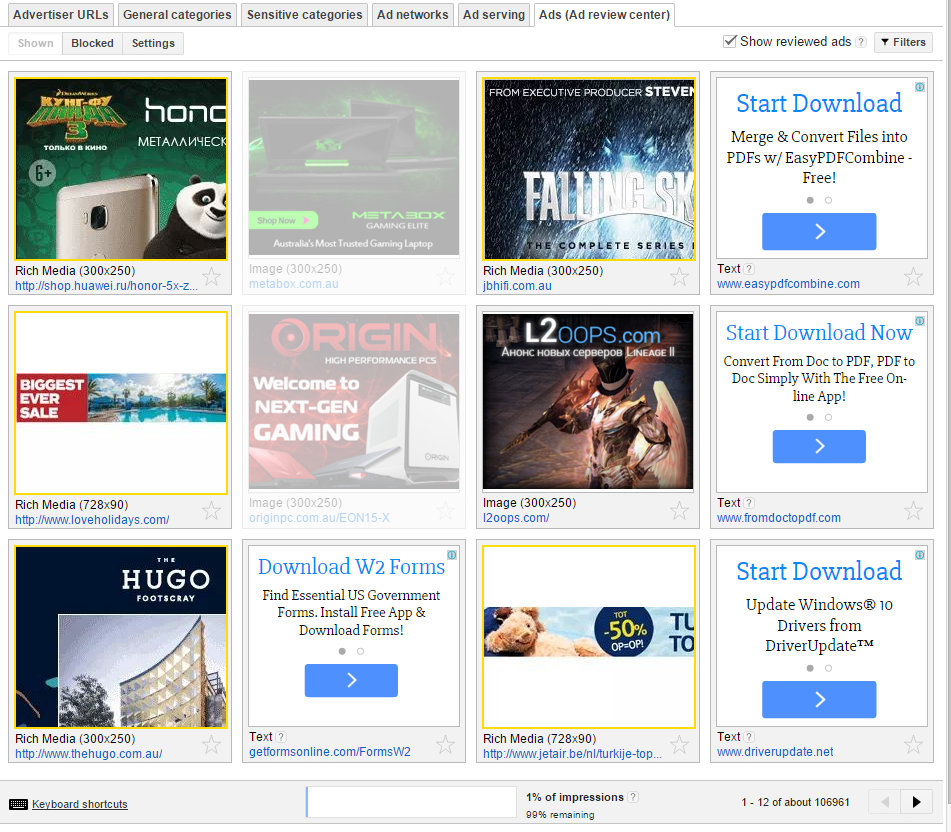
Here’s an example I just pulled off AusGamers right now:
If you’re a user, these make browsing the web irritating at best, but really they’re outright deceptive and can even be dangerous.
It’s obvious why these ads exist – there are enough users out there clicking on them to make them profitable. The cost of running the ad is less than whatever profit the advertisers are making from selling whatever the hell it is that they do.
As a result, it’s obvious why they end up on sites like AusGamers. AdSense rewards site operators on a per-click basis. Ads that perform well reward them more. On sites that offer a lot of downloads where the user’s brain is already in “GIVE ME THE DOWNLOAD BUTTON” mode, it is pretty easy to see how they work.
I have always hated these buttons for this reason. I was massively embarrassed when I started seeing these on AusGamers – putting AdSense on our download pages was something we did only relatively recently. So I decided to try to turn them off.
After figuring out the AdSense control panel I discovered that you could in fact block certain types of ads. However, each ad needs to be blocked individually in the Ad Review Center. This is what it looks like right now:
If you click through you’ll see there are 12 ads there – several of which are stupid download ones – but that this is only page 1 – 12 of about 106,961! Now, Google anticipated that you might not want to click through hundreds of thousands of pages of ads, so you can actually block entire ad accounts.
I went through several times when we first had these ads turn up and started blocking ads and accounts. Here’s a screen capture from a couple years ago:
This is just one page of many (… many) which contains all the ads I’d blocked. Further, I’d blocked all the accounts I could find responsible for these kind of ads. But it made basically no difference to the number of these ads that showed up on the site.
It was an unstoppable tide of bullshit ads that – despite spending many hours manually blocking ads and blocking accounts – I could do nothing about. It made me sad.
I’m relieved to see Google taking action on this. It will make the web better. It will make users safer. And it will make site operators that run AdSense feel less like jerks for having these deceptive ads on their sites.
I’m a big fan of Mozilla and have been a Firefox and Thunderbird user and advocate for many years. The last few years of development on these projects have left me somewhat disillusioned. Firefox seems to be slowly converging on Chrome, with disruptive UI changes making each update irritating, rather than exciting. Thunderbird, despite regular updates, feels like it has stagnated.
I feel like Mozilla have already won the browser wars. I’d love to see more effort going into Thunderbird and Lightning – groupware being something that open source is still really struggling with despite many valiant efforts.
It’s hard to convince myself this is a big deal; web-based groupware is pretty good these days. But I use Thunderbird every day. I’ve become almost dependent on a bunch of excellent extensions. I love having the option to be in complete control of my email.
I wrote about this in a bit more detail at Medium.
Update:
This seemed to resonate with a few people – ended up being the 18th “Most Read” article on Medium and was featured in their Technology section. Also spawned interesting discussion on reddit and Slashdot.
The full article is reproduced below.
Forgetting Firefox
It’s been more than 10 years since Mozilla released version 1.0 of Firefox. Even for someone that lived through all those early web years it’s hard to imagine what it was like back then — almost everyone who used the web was using Internet Explorer on Windows, something which seems almost comical now in this age of Chrome and Safari and mobile browsing.
Back then though, there wasn’t much of a choice. There were a few alternatives, but many sites were built only with IE in mind, simply due to its huge market share (almost 80%). So chances were good that even if you were running something else, you’d have IE ready to fire up in the background.
I’ll confess that during this time, our web development company was building for IE. Testing in other browsers — if it happened at all — was cursory. We’d fix specific issues in other browsers if they were reported by users, but these were pretty rare.
Today, of course, it is almost the exact opposite. Chrome has the lion’s share in the desktop world. IE is still a respectable second place, though only a fraction ahead of Firefox. Mozilla’s mission of 2004 — to break up the web’s monoculture and near-complete dependence on Internet Explorer — would seem to be over.
Microsoft can no longer afford to let IE not comply with certain standards. Indeed, the argument can be made that it is a second class web citizen and is, more often than not, forced to play catch up to everyone else.
The Mozilla Foundation was established in 2003 to “preserve choice and innovation on the Internet”. I believe they’ve succeeded — perhaps beyond their wildest dreams — in the web space. Who would have thought a small foundation creating open source software could upset one of the biggest software companies in the world and help completely disrupt their near-total market dominance?
Mozilla and Firefox Today
Since Google introduced their Chrome browser, Firefox use around the world has been shrinking. While it is far from an afterthought, it’s clear that many users have jumped ship to Chrome — usually citing performance as the main reason. I listen to the expressions of surprise from my colleagues and peers when they hear about someone using Firefox — “why haven’t you switched to Chrome?”, typically resulting in another convert by the end of the conversation.
Further, as more and more browsing is done on mobile devices — where the trend again seems to be to use the standard browser that ships with the operating system — the growth of Firefox seems an unlikely prospect.
However, Mozilla has not stopped working on Firefox. Indeed, change has continued at a furious pace — back in 2011 they switched to a rapid release schedule, aiming to ship a new release build of Firefox every six weeks, calling this change “a major improvement in our ability to respond to the needs of our users and the web”.
The Firefox version number has rocketed skyward. From 2004 to 2010, Firefox went from version 1.0 to 3.6.13. Once their rapid release schedule kicked in though, they burned all the way through to version 33.0, released in October 2014.
Of course, the version numbers aren’t really indicative of much — though some critics deride the versioning strategy as nothing more than a way to try to seem as “fresh” as Google Chrome’s much higher version numbers. What really matters is what has changed under the hood, and there have certainly been a huge number of changes.
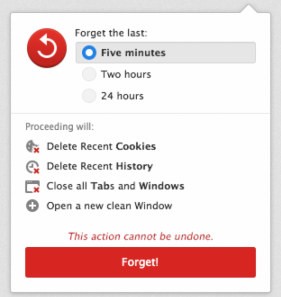
Although, as I write this, it’s hard to think of what those changes have been. I certainly can’t think of any new feature that made me go “oh, that’s cool” or “great, I’m glad they finally fixed that” or “sweet, this rocks!” Maybe the background updater? WebRTC support, although I haven’t used it yet. The main feature of their 10 year anniversary special release was just a widget that lets you forget certain parts of your history and some new built-in search options.
Sadly, I have almost come to dread new releases. “What is going to break this time?”, I think. “What random interface changes are they going to introduce?”
However, this essay isn’t about railing on Mozilla for problems with Firefox releases. This is an issue, but there are already many words devoted to covering this in great detail — simply look at basically any Slashdot discussion about any new release and you’ll see a laundry list of complaints (my favourite is the one when they introduced the new Australis redesign).
No, my problems with Firefox are something I see as merely a symptom of the real problem:
Mozilla has already won the browser wars.
Their core mission has been accomplished. Their goal was never to create the most popular browser in the world, or the one with the best UX, or the one with the most features, or the one with the best developer mode. Their goal was to “preserve choice and innovation on the Internet”.
It would be foolish to say a monoculture will never arise again (Google are making some scary moves with Chrome-only web applications). But at this point in time while Chrome is the ascendant browser (largely at the expense of Firefox), Mozilla’s ability to impact the web in general is greatly reduced. (Arguably, the rate of change and the dramatic impact to the long-standing UI and UX could be driving more people away from it.)
Mozilla are not focusing all their efforts on the web alone. While Firefox seems to get the lion’s share of funding and attention, they’ve been extremely hard at work building Firefox OS, an operating system for mobile devices. Mozilla Labs continues to spit out a range of interesting R&D projects.
One other well-known and widely used Mozilla project is, of course, the Thunderbird email client. In 2012, after several years of active development and significant improvements, Mozilla decided that Thunderbird would basically be put into caretaker mode, letting the community drive development.
The groupware mess.
Before going forward, I want to touch on the state of groupware — that being the collection of applications, tools and services that organisations use to collaborate digitally, typically including email and calendar systems.
For many years, Exchange was the uncontested leader in this market. Microsoft’s dominance in this area was almost complete — nothing packed the same level of functionality for communication and collaboration with the same ease of deployment, not to mention the integration with the rest of the Microsoft software ecosystem. Sure, it wasn’t without problems, but it was as close to a groupware standard as existed.
Then Google came along, sniffing a great opportunity. Google Apps offered simple pricing and an experience that almost everyone was pretty familiar with due to the penetration of Gmail and Google Calendar — companies could switch over and not have to worry too much about retraining. Companies heavily entrenched with Outlook couldn’t switch, but for the vast majority of small businesses it was a pretty attractive deal.
Fast forward a bit to 2015 — Amazon have just announced WorkMail, an e-mail and electronic calendar service, targeted directly at customers of Microsoft and Google. It’s clear they’ve been thinking about this for a while; as one of the biggest cloud providers and software developers they’re uniquely positioned to offer services around the planet.
Having these three options will be a great improvement for consumers. The growth of cloud shows little sign of curbing and the increasing simplicity it offers to businesses — “we no longer have to deal with keeping Exchange running?!” — is pretty appealing. So as long as you’re happy with paying another organisation to hold onto some of the critical data of your business, you’re fine.
If you’re turning to open source, there are a few options. I can only claim personal experience with Zimbra — it’s a great piece of software, if a bit fiddly to get and keep running. Finding the one that matches your requirements can be tough and time consuming.
Ultimately we found that we couldn’t stop people wanting to use Outlook. It has a lot of momentum. It has polish and features that make the open source equivalents feel somewhat clunky, awkward and limited by comparison. Zimbra works with Outlook (if you pay for the commercial version with the magic connector), or you can just use the web interface.
But people who are serious about email typically want to use a serious email client. They want plugins and heaps of interface options. They want instant response times. They want a local copy so it can be accessed offline (or if you’re truly hardcore, you don’t want your email on someone else’s server in the first place). You want to have the files that make up your email collection stored on your own disk, so you can back them up and manipulate them at your convenience.
And so we come back to Thunderbird.
Mozilla’s chance to really impact groupware.
Mozilla has already done more for groupware than just about anyone, simply by the existence of Thunderbird in the state it is in today. (Lightning, their calendar application/extension is also a Big Deal.)
But it seems an opportunity exists for Mozilla to once again take the lead in a critical aspect of Internet infrastructure. Microsoft’s blood is in the water as their iron grip on key parts of both the home and business software ecosystems has started to slip.
But Mozilla is in a unique situation — they have a significant lead in the application space. Thunderbird has little mass market penetration and is far from perfect, but in terms of core functionality and stability it is very well positioned. (Lightning needs a lot more work.)
Just like Mozilla made Firefox a unifying piece in the standards-based web that we enjoy today, the opportunity exists to drive Thunderbird as a critical piece of our Internet communications infrastructure.
There are many challenges. The mass market and home users are unlikely to migrate away from web-based mail; it’s simply too convenient. But businesses and business users have a different set of priorities, and being in firmly in control of their own destiny when it comes to their assets is one of them.
Even as I write this, I can’t help but wonder if there’s any point. The cloudification of mail and calendar is just so useful and popular — how could anything turn it back?!
But then I remember what it’s like when an online service goes offline and you can’t get your provider to help out. I remember the NSA, and the risks associated with having my mail and calendar lying around on someone else’s servers. I remember promises of backups being made, only to find that after a disaster, they turned out to not work.
Thunderbird is a tool that can help ensure that users have the choice to retain control. Already a strong, feature-complete product, it’s perfectly usable right now — but it needs more. It needs focus and drive, the kind of effort that pushed Firefox into being the dominant alternative for so long. Mozilla need to re-establish credibility with users by ruthlessly fixing some of the years-old bugs and proving that they see Thunderbird as a critical piece of the Internet, like they did with Firefox.
Ultimately, Mozilla needs to make the nerds really love Thunderbird, recommending it above all else. Just as we were responsible for pushing Firefox (and now, it seems, Chrome) on civilian friends, family and businesses who defer to our geek cred when it comes to software selection… if Mozilla can convert us — we can convert them.
But we’ll only do that if it’s a legitimately better option for them. (And for us — saving us tech support calls is a big factor here!) A strong groupware client with excellent support for email and calendaring is just as important to the open Internet as a browser — for both business and personal use, we need good choices.
Mozilla: you won the browser wars. We will be eternally grateful. But we need you again to help preserve choice and innovation on the Internet. Please help us by devoting some of your incredible talent back to Thunderbird to help drive the state of groupware forward.
WordPress is a great piece of software, but it’s popularity and superficial ease-of-use combined with the fact that computers are hard means running a site on WordPress is not always as simple as it seems.
I wrote about some of the ways to reduce the risk with WordPress over on the Mammoth blog a while back.
One of the biggest risks is a WordPress site that is out of date. There are three main components to the WordPress site:
– Core: the base functionality you get on a brand new installation.
– Plugins: all the other stuff you install for functionality
– Themes: what things look like
Each component is typically its own code base, requiring maintenance and updates. Many users only know they have updates available when they log in – and many of them don’t log in that often, especially if their site is primarily static.
WPUpCheck is a simple Windows tool that polls a WordPress site periodically to check for updates in any of these three components. If it detects available updates it will bring it to your attention via a balloon in the system tray.
The goal is simple – try to ensure a larger number of WordPress sites are no longer running obsolete, out-of-date, potentially vulnerable software.
Update 2021-02-23: A few people have left comments saying these instructions no longer work. Unfortunately I’m not surprised – they’re quite old and MediaWiki has evolved significantly. They still work in my ancient version which I still have on an old Debian box.
I am planning on migrating this onto a new server soon so I will be revisiting this soon*.
*May not be soon
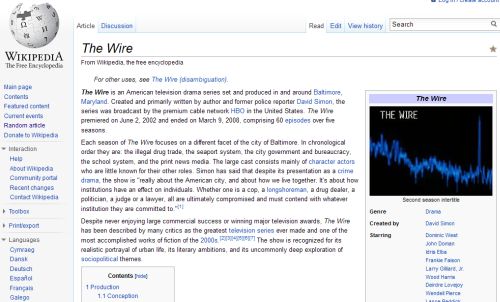
This article explains how to add the “Infobox” template to your MediaWiki installation. It is primarily intended for people who have installed v1.23 from source.
This is an updated version of this older post about setting up Infobox on earlier versions of MediaWiki. It is basically the same but has been modified to be suitable for the current (at the time of writing) version of MediaWiki, v1.23. Please see the older post for more info and background as well as helpful commentary from other users in different circumstances.
Here are the basic steps necessary to add working Infoboxes to a freshly installed version of MediaWiki. Note that the original steps required the install of ParserFunctions; this is no longer required as it ships with recent versions of MediaWiki by default.
Download the Scribuntu extension into your extensions folder and add it to your LocalSettings.php as described in the ‘Installation’ section.
Copy the CSS required to support the infobox from Wikipedia.org to your Wiki. The CSS is available in Common.css. You’ll probably need to create the stylesheet – it will be at http://your_wiki/wiki/index.php?title=MediaWiki:Common.css&action=edit – and then you can just copy/paste the contents in there. (I copied the whole file; you can probably just copy the infobox parts.)
Export the Infobox Template from the Wikipedia.org:
Leave the field for ‘Add pages from category’ empty
In the big text area field, just put in “Template:Infobox”.
Make sure the three options – “Include only the current revision, not the full history”, “Include templates”, and “Save as file” – are all checked
Hit the ‘Export’ button; it will think for a second then spit out an XML file containing all the Wikipedia Templates for the infobox for you to save to your PC.
Now you have the Template, you need to integrate them into your MediaWiki instance. Simply go to your Import page – http://your_wiki/wiki/index.php/Special:Import – select the file and then hit ‘Upload file’.
With the Templates and styles added you should be able to now add a simple infobox. Pick a page and add something like this to the top:{{Infobox
|title = An amazing Infobox
|header1 = It works!
|label2 = Configured by
|data2 = trog
|label3 = Web
|data3 = [https://trog.qgl.org trog.qgl.org]
}}
Save, and you should end up with something that looks like this:
… and also a good thread on LowEndTalk.com, a developer-focused community for infrastructure services.
There’s still a lot of work going on behind the scenes. New features are still be developed – most recently, a new BYO ISO system, allowing people to install their own operating systems, including things we haven’t supported before like FreeBSD.